The message "You've been logged out of your account" suddenly appeared
Share


Copied
Important: The information about phone numbers in this Help article only applies to
LINE users in Hong Kong, Japan, Korea, Taiwan, and Thailand.
If the "You've been logged out of your account"
screen appears, it means your account is currently inaccessible. This can happen due to reasons such as the status
of your phone number, verifying your phone number on another device, or someone accessing your account without
authorization.
Please check if you can log back in and follow any necessary steps based on the on-screen
details and your specific situation.

Attention
- Do not tap Delete. First, check the following scenarios and follow the guidance for the one that matches your situation.
Confirming your situation
Select the situation closest to yours just before the "You've been logged out of your account" screen appeared.
I logged into LINE via an external link (e.g. social media post/message, text message, email)
 Your account may have been stolen.
Another person may have logged into your account after the login information you entered on a phishing site
(imitation site) was stolen.
Do not tap Delete. Follow the
guidance in Someone may have accessed your account without
authorization.
I verified the same phone number with LINE on another device
If you verify the same phone number on another device, your original LINE account will be
deleted.
Follow the guidance in You verified the same phone
number with LINE on another device.
I hadn't registered my current phone number to LINE
If the phone number you registered to LINE isn't the same as your currently contracted phone number, you
may suddenly be logged out of your account.
Follow the guidance in You haven't registered your currently contracted phone number to LINE.
I'm not sure what happened or which situation applies to me
Someone may have accessed your account without authorization.
Another person may have logged into your account with login information that was stolen by a phishing site
(imitation site) or other fraudulent platform without you realizing it.
Do not tap Delete. Follow the guidance in Someone may have accessed your account without authorization.
You haven't registered your currently contracted phone number to LINE
If the phone number you registered to LINE isn't the same as your currently contracted phone number, you may suddenly be logged out of your account.
- Once a certain amount of time passes after canceling your phone number, someone else can enter into a contract for it and use it.
- That phone number is reassigned to someone else.
- The other user registers that phone number to their LINE account.
- The "You've been logged out of your LINE account" screen will appear on LINE for you, and the original LINE account you've been using will become inaccessible.
The other person hasn't stolen your account and has no access to your LINE data (such as your
friends or chat history).
As there is no way to transfer your original account, we ask that you create a new LINE account with
your current phone number.
About your paid items
We may be able to transfer the following paid items, provided you still have access
to the email address registered to your previous LINE account.
Note: Depending on the results
of our investigation, we may not be able to transfer your items.
- Stickers, themes, and emoji (including those received as gifts)
- Your purchase history of paid items, along with your Coin and LINE Point balances
- Your Credit balance added on LINE STORE
After confirming the important points below, contact us via the Inquiry Form.
Important notes
Be advised
- We only accept inquiries from the owner of the LINE account that's having the issue.
- In principle, we do not accept inquiries made on behalf of family members, friends, or acquaintances.
- For questions that require you to fill in certain information or details about a situation on this Inquiry Form, make sure that you provide complete and accurate information relevant to your situation.
You verified the same phone number with LINE on another device
With LINE, you can only register one LINE account with one phone number.
When you
register the same phone number to a different LINE account, the LINE account it was originally registered with will
be deleted.
As there is no way to restore your original LINE account, we ask that you continue using the
account you currently have access to, or create a new one.
About your paid items
We may be able to transfer the following paid items, provided you still have access
to the email address registered to your previous LINE account.
Note: Depending on the results
of our investigation, we may not be able to transfer your items.
- Stickers, themes, and emoji (including those received as gifts)
- Your purchase history of paid items, along with your Coin and LINE Point balances
- Your Credit balance added on LINE STORE
After confirming the important points below, contact us via the Inquiry Form.
Important notes
Be advised
- We only accept inquiries from the owner of the LINE account that's having the issue.
- In principle, we do not accept inquiries made on behalf of family members, friends, or acquaintances.
- For questions that require you to fill in certain information or details about a situation on this Inquiry Form, make sure that you provide complete and accurate information relevant to your situation.
Someone may have accessed your account without authorization
If the first two topics covered in this Help article do not apply to you, someone may have
entered your verified information and logged in to your account without authorization.
Follow the flowchart questions and select your result number (1–5) below for more details.
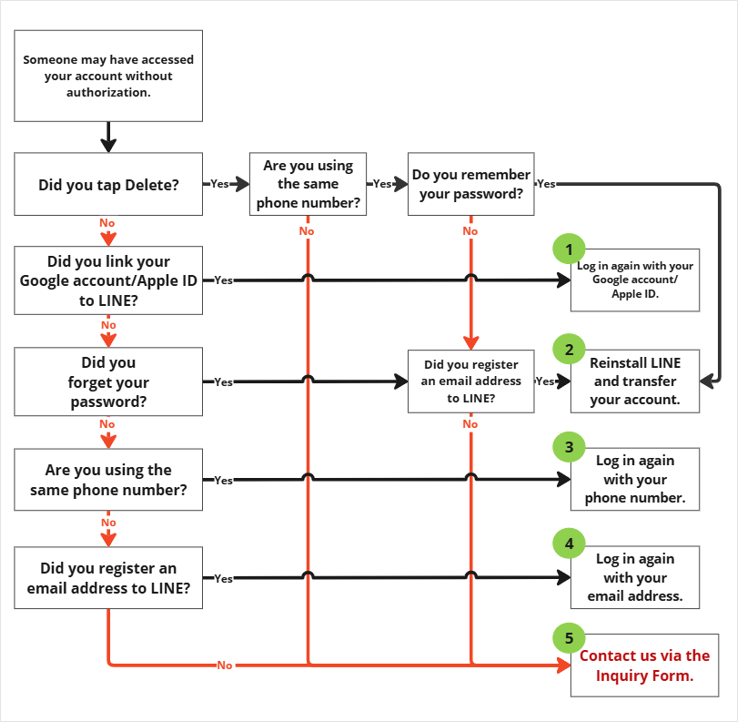
1. Log in again with your Google account/Apple ID.
If you linked an Apple ID/Google account to the LINE account you used, you can log in to the account again.
- Tap Re-login.
- Tap Continue with Apple or Continue with Google.
- Tap Continue with Apple or Continue with Google and log in by following the on-screen information.
- Make sure the "Log in as XXXX" screen appears for your account, then tap Log in.
2. Reinstall LINE and transfer your account.
You can transfer your LINE account with your phone number if the following points apply to your situation.
- You remember the password you registered to your account.
- You've registered an email address to your account.
If you're unable to transfer your account, check the points in the "Be advised" section below, then contact us.
Be advised
- We only accept inquiries from the owner of the LINE account that's having the issue.
- In principle, we do not accept inquiries made on behalf of family members, friends, or acquaintances.
- For questions that require you to fill in certain information or details about a situation on the Inquiry Form, make sure that you provide complete and accurate information relevant to your situation.
- After confirming the above points in this section, please contact us via this Inquiry Form.
3. Log in again with your phone number.
If you're using the same phone number registered to the LINE account you used and know your password, you can log in to the account again.
- Tap Re-login.
- Tap Log in with phone number.
- Select your country, enter your phone number, check the Terms and Conditions of
Use and Privacy Policy, then tap
 .
. - Enter the verification code you received via text message.
Note:
- On some Android devices, the verification code is entered automatically. In this case, you will proceed to the next step.
- If you can't receive text messages, try the Call me instead option. - Enter your password and tap .
4. Log in again with your email address.
If you're using a different phone number than the one registered to the LINE account you used, you remember your password for the account, and you registered an email address to it, you can log in to the account again.
- Tap Re-login.
- Tap Log in with phone number.
- Select your country, enter your phone number, check the Terms and Conditions of
Use and Privacy Policy, then tap .
- Enter the verification code you received via text message.
Note:
- On some Android devices, the verification code is entered automatically. In this case, you will proceed to the next step.
- If you can't receive text messages, try the Call me instead option. - On the "Phone number not found" screen, tap Log in with email.
- Enter your email address and tap .
- Enter your password and tap .
5. Contact us via the Inquiry Form.
If you're unable to log in again, check the following information, then contact
us.
We will look into whether your account was stolen and will take the following actions if we
determine it was.
- We will delete your LINE account to prevent misuse by the culprit.
- If you have paid items or Coins, we will transfer them to a new LINE account.
Please check the points in the "Be advised" section below, then contact us.
Be advised
- We only accept inquiries from the owner of the LINE account that's having the issue.
- In principle, we do not accept inquiries made on behalf of family members, friends, or acquaintances.
- For questions that require you to fill in certain information or details about a situation on the Inquiry Form, make sure that you provide complete and accurate information relevant to your situation.
- After confirming the above points in this section, please contact us via this Inquiry Form.